Barcelona from Prague with Vueling this winter
72 €



Would you like to find out where a flight is currently flying, when it will arrive, or whether it’s delayed? You can track a flight’s current location for free on Flightradar24. Simply enter the flight number and select the correct flight.
I mainly use Flightradar24 myself, so I’ll use it as an example to show you the basic procedure.
Other options include FlightAware, FlightStats or AirNav Radar.
💬 Which app or website do you use, and why? Let us know in the comments below the article.
It depends on what you need to find out:
Looking for a past flight? Below you’ll also find instructions on how to check your flight history and the actual landing time.
You’ll find the flight number on your booking confirmation, e-ticket or boarding pass. It takes the form, for example, of DL79: the airline code and the specific flight number.
Please note that the booking reference is not the flight number. The combination of letters and numbers that you use to manage your booking will not help you when tracking your flight publicly.
On the other hand, you use the booking reference when checking your flight booking.
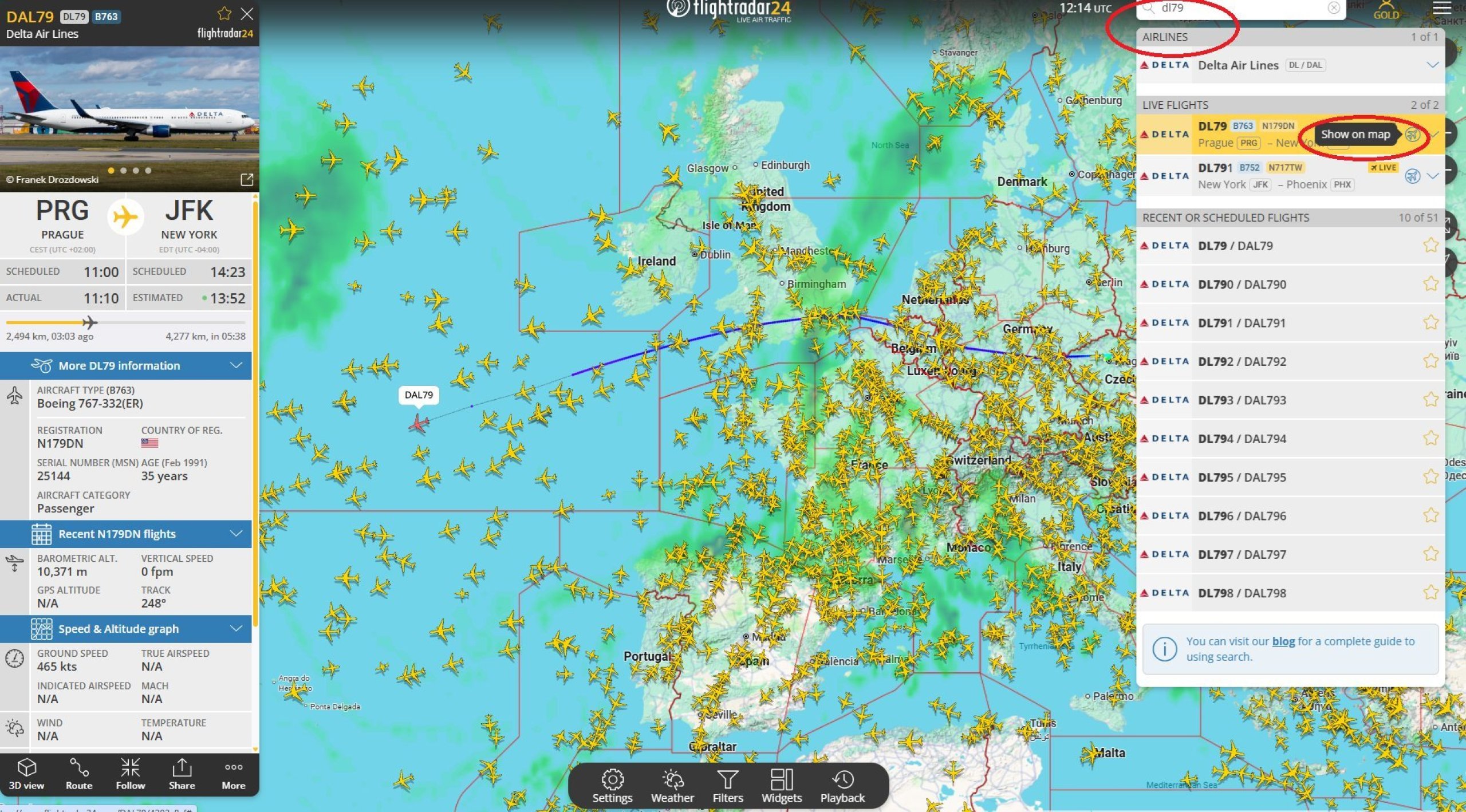
On Flightradar24, follow these steps:
In the details, you can find, for example, the route, aircraft type, altitude or speed. The availability of individual data depends on the specific flight and the version of the service.
If the flight has not yet taken off, the aircraft may not be visible on the map. Check the scheduled departure time and the current status of the flight.
If the flight is already in the air, the word ‘Live’ and an aeroplane icon will appear next to the flight details. Click on this to view the aeroplane’s current position.
Do you only know the route and an approximate time? Use the route search on FlightAware or FlightStats.
Enter the departure and arrival airports and select the correct flight from the list.
On FlightStats, you can also refine your search by date and time.
The airport’s departure or arrival display boards can also help. You’ll find the flight number for your flight there, which you can then enter into the flight tracker.
If there are several flights a day on that route, check the departure time and the airline. A match in destinations alone is not enough.
If you’re picking up a passenger, check the airport’s official website as well. You’ll be able to see the aircraft’s location on the radar, whilst the arrivals board will show the flight status and any available information about the terminal.
Personally, however, I’ve found it more useful to check Flightradar24, which, paradoxically, tends to provide more accurate and up-to-date information than the airport’s own website.
Note the difference between the various times:
Flightradar24 always indicates the actual arrival or landing time.
Landing does not necessarily mean that passengers are already in the arrivals hall. This is followed by taxiing, disembarking from the aircraft and, where applicable, passport control or waiting for luggage.
You can find information on transport, terminals and other services in our airport guides.
Are you tracking the delay to your own flight? Read on to find out how to claim compensation for a delayed flight. If the conditions are met, you may be entitled to up to 600 eur per person.
Find out if I’m entitled to compensation
Are you facing a late arrival or an early departure? Consider staying overnight near the airport so you don’t have to worry about transport in the middle of the night ->Find accommodation on Booking.com.
Enter the name of your airport in the search bar and check the distance from the terminal to the hotel before booking.
If you need accommodation due to a delayed or cancelled flight, check with the airline first to see if they can arrange it for you.
If you’re curious about a plane you can see in the sky right now, you don’t need the flight number.
On your mobile, the Flightradar24 app for Android or iPhone is ideal for this. If you allow access to your location, it will be easier to identify the aircraft in your vicinity.
Not every aircraft will appear on the map. If you cannot find it, there may be a gap in coverage or its transponder may not be switched on (this applies, for example, to some small sports, government or military aircraft).
The radar will tell you the type of aircraft and the airline. If you’re also interested in a view from the cabin, take a look at our review of Emirates’ business class on the Airbus A380, for example.
You can find more on-board experiences and photos in our flight reviews.
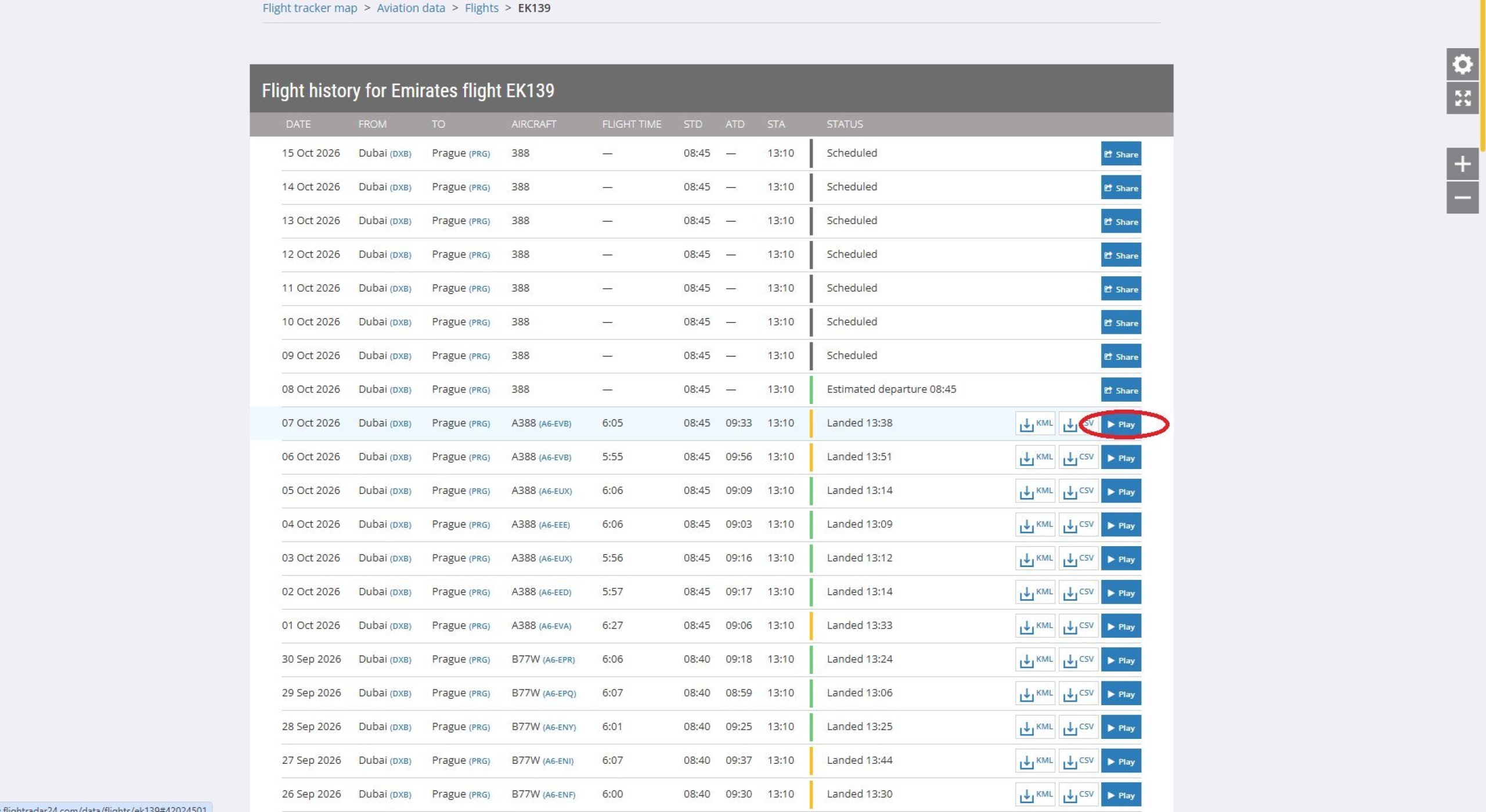
Would you like to find out which route you flew or what time your plane actually landed? Search for the flight number on Flightradar24 and open the record for the date your flight departed.
For any available record, you can view the route and flight times. To play back the aircraft’s movements, look for the ‘Play’ option.
The scope of the history depends on your subscription:
You can find the current offers and prices in the Flightradar24 subscription overview. Before paying, please check whether a recording of your specific flight is available.
Please note the time zone. Check whether the service displays the airport’s local time or UTC. For night-time flights, the arrival time may fall on a different day to the departure.
The record you find will help when verifying the delay. Make a note of the flight number, date, route and take a screenshot of the available details.
However, the landing time is not the same as the arrival time for the purposes of assessing compensation. Under EU rules, the decisive factor is when at least one of the aircraft’s doors is opened, provided that passengers are permitted to disembark.
The landing time alone may therefore not be decisive in cases where the delay is close to the 3-hour threshold.
Entitlement also depends on the route, the carrier and the cause of the delay. You can find detailed guidance in the article ‘Compensation for delayed flights’.
If you wish to entrust the claim to an agency, you can check your compensation options via ClaimCloud.
I use Flightradar24 as my main service. If you don’t like its display or want to compare data, try one of these options.
|
Service |
What it’s used for |
|---|---|
|
Tracking aircraft on a map and viewing flight history |
|
|
Search for a specific flight or a connection between two airports |
|
|
Check flight status by airline, flight number and date |
|
|
Another map showing current air traffic and information about aircraft |
Both FlightAware and FlightStats allow you to search for a flight by route, which is useful if you don’t have the flight number to hand.
AirNav Radar offers a similar way of tracking flights on a map to Flightradar24. You can use it to view the route and available aircraft data.
For information on check-in, departure gates or rebooking, please also use the airline’s website or app.
A flight not appearing on the radar does not in itself mean that it has been cancelled or that something has happened to the aircraft.
First, check the date, route and number on your ticket. If the flight is sold by a different airline to the one actually operating it, it may be listed under a different number.
Try searching by route or using the airport’s arrivals board. For charter flights, the name of the actual operator may help.
The service may temporarily stop receiving its location. This is usually caused by a gap in coverage, a technical problem or signal interference.
Check the flight status on the airline’s website, the airport’s website or another flight tracker. The disappearance of the icon does not necessarily indicate an emergency.
Tracking services use different sources and may update their data at different times. Differences may also arise due to time zones or whether they are displaying landing, arrival at the stand or an estimated time.
If you are organising your own journey to the airport, follow the airline’s instructions. A delay shown on the radar is not, in itself, an instruction to arrive at the airport later.
💬 Can’t find a specific flight? Please post the flight number, date and route in the comments. If we have the necessary information, we’ll try to help.
Nowadays, most commercial aircraft (as well as some private and sports aircraft) are fitted with an ADS-B transponder, which transmits information on position, speed and so on.
These signals can also be picked up by any amateur receiver connected to the Flightradar24 programme.
Anyone with a device capable of receiving ADS-B signals can contribute. There are currently thousands of contributors, which is why Flightradar24’s coverage is now virtually 100 per cent in most civilised areas.
In the US, Flightradar24 also collects data from conventional and official radars, meaning that up to 95 per cent of all aircraft are displayed.
If you’re a real enthusiast, you might find one of the paid versions useful. These include additional features not available in the basic version:
If you have any questions or comments about the article...